 We encourage you to play responsibly. For guidelines
How to Withdraw at PlayOJO
By Daniel Grant
Updated 21 Nov, 2025

At PlayOJO, we’ve got all the latest casino games from the top providers, including blackjack, roulette, jackpot slots and live dealer, and withdrawing winnings is one of the most important parts of the experience.
That’s why for almost all of our players, there’s no waiting around when you make a withdrawal. Instant cashouts and huge game choice are a big part of the fun at PlayOJO, but we also love fair play. That means bonuses with no wagering, and money back on every game with OJOplus.
Here’s all you need to know about making a withdrawal at PlayOJO.
Withdrawal Methods Available
When you’re ready to withdraw funds from your PlayOJO wallet, you first need to choose a withdrawal method. Here is an overview of the options.
Visa. This is a quick and easy way to withdraw casino funds, thanks to the Visa Fast Funds feature. Simply enter your card details, verify the information and your money will be on its way.
Mastercard. If you have already deposited with a Mastercard debit card, this withdrawal method will be available to you. Just fill out the details and choose your cash-out amount.
PayPal. This e-wallet is a popular, secure, and simple way to withdraw funds. Choose PayPal as your withdrawal method, enter the details and click submit. Be aware that the minimum amount you can withdraw with this method is £20.
Apple Pay. From your Apple device, click ‘My Account’ and ‘Withdraw’. Select Apple Pay from the list of withdrawal methods, fill out the details and click ‘Submit’. Note from OJO: You can only use Apply Pay when making a withdrawal on an Apple mobile device – it’s not available on laptops or desktop PCs.
Instant Bank Payment. This is a fast, secure and simple withdrawal method. Simply select ‘Instant Bank Payment’ from the list of options and follow the instructions.
How to Make a Withdrawal
After selecting a withdrawal method, follow these steps to get your funds.
Log in to Your Account. Input your PlayOJO ID and password.
Navigate to the Withdrawal Section. Click the ‘Withdraw’ tab and you’ll be taken to the withdrawal method page.
Select a Withdrawal Method. The options include Visa, Mastercard, PayPal, Apple Pay or Instant Bank Payment. Be aware that some options, like Mastercard and Apple Pay, can only be used to withdraw if you used them to deposit. Note from OJO: Not all banking methods will be available in every country.
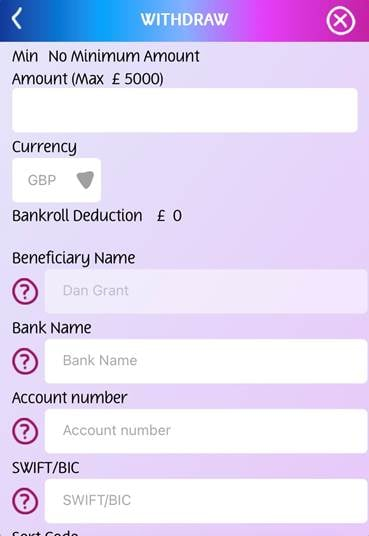
Enter the withdrawal amount. Enter the amount and currency you wish to withdraw your funds in.
Confirm the transaction. Fill out any other required details and click ‘Confirm.’
Minimum and Maximum Withdrawal Limits
These limits dictate how much a player can withdraw daily, weekly and monthly. The amounts can vary for several reasons, such as the payment method used, a casino’s policies and a player’s status. Here at PlayOJO, we like to keep things easy peasy, so we have no minimum withdrawal limits for Visa, Mastercard, ApplePay or Instant Bank payments.
Maximum withdrawal amounts are decided on a case-by-case basis. Log in to your PlayOJO account and head to the cashier for more information. There’s also no fee to withdraw your money from any of the available withdrawal methods – your winnings are yours. Note from OJO: PayPal may charge fees for currency exchanges or if you send money outside of the UK.
Withdrawal Processing Times
Accessing your winnings fast is the cherry on top of a great gaming session. Here at PlayOJO, we do everything we can to ensure withdrawals are processed within minutes.
How fast your funds reach your chosen withdrawal method depends on a few factors. Here is an overview of the two steps involved:
How Long We Take To Process Your Request
Once you have requested a withdrawal via the cashier, our team will process your withdrawal. In fact, most withdrawals processed instantly.
In some cases, we may need to make additional checks and as a result, this processing time may take a little longer. If there’s likely to be a delay, we’ll get in touch to let you know.
When You’ll Receive Your Funds
Once we have processed your withdrawal, the time it takes to credit funds back to your chosen method depends on the payment provider.
Ewallets like PayPal and Trustly credit your funds instantly, and many debit card withdrawals will be credited immediately too, though others may take a little longer to clear. For more information, check with your financial institution.
Verification
When you make a withdrawal request for the first time, you will have to pass a verification process. This helps us to protect players and it ensures that the right amount of money is sent to the right person. Not only that, but this procedure helps to prevent money laundering and identity theft.
So, this is what can cause a short delay when you initially request a withdrawal. Once we have verified you and your documents, withdrawals will be a lot quicker.
What Documents Do We Need?
Online casino verification can be a bit of a pain. But remember, we only want to ensure that your money gets to you! Here are a few documents that you’ll be asked for when processing a withdrawal for the first time:
Proof of ID (eg; driving license, passport or government-issued ID)
Proof of address (eg; bank statement or utility bill
Copy of debit/credit card if using this withdrawal method
Submitting the required documents is simple and you only have to do it once unless any of your personal information changes. Just head to the cashier and follow this guide for uploading your documents.
Related Posts

Daniel Grant
About the Author
Dan Grant is a 25-year veteran of the gaming industry and a leading authority on iGaming content with over 1,000 articles on topics such as industry trends and bankroll strategy. He began in sports betting in 1997, then spent 11 years at a leading poker brand. As a content lead for iGaming marketing agencies, Dan has worked with over 30 regulated gaming brands, including giants like IGT. He also has a Law degree, providing a unique perspective on the regulatory complexities of the gaming market.
FAQs
What withdrawal methods does PlayOJO offer?
OJO offers a range of secure withdrawal methods such as Visa, Mastercard, PayPal, Apple Pay and Instant Bank Payments.
Can I make withdrawals using my mobile?
Yes! And it’s extremely simple. Just follow the processes detailed in this guide.
Can I withdraw funds to a different payment method than the one I used to deposit with?
No, unless you deposit funds with more than one method. Your money will be sent back to your initial deposit method.
What are the fastest withdrawal options?
We process most withdrawals instantly, and because withdrawal options like PayPal, Visa, Apple Pay and Instant Bank Transfer often process your funds instantly too, that means you could get your winnings minutes after submitting your withdrawal request.
What’s the minimum and maximum withdrawal amount?
We don’t have minimum withdrawal amounts like some other casinos. To check the maximum withdrawal amount, log into your PlayOJO account and head to the cashier.
What withdrawal fees does PlayOJO charge?
We NEVER charge withdrawal fees to withdraw your funds. Your money is your money and you will get the full amount.
Am I required to provide personal documents to withdraw money?
You may be asked to provide verification documents such as an ID or passport if you didn’t provide these on sign-up. But we will only ask for these once as part of our security procedure.
Why is my withdrawal pending?
Your withdrawal may be marked as ‘pending’ while you are going through the verification process. Once your documents have been reviewed, the funds will be released.
Availability depends on your country





'%3e%3cg%20id='Group'%3e%3cg%20id='Group_2'%3e%3cg%20id='Group_3'%3e%3cpath%20id='Vector'%20d='M24.127%203.03223H35.6789V5.65009H27.1313V9.47147H32.8239V12.0893H27.1313V16.3587H35.9425V18.9766H24.127V3.03223Z'%20fill='%2323208F'/%3e%3cpath%20id='Vector_2'%20d='M35.6797%207.64429H38.7544L41.4425%2015.5418L43.9374%207.64429H46.9154L42.7866%2018.9766H40.0282L35.6797%207.64429Z'%20fill='%2323208F'/%3e%3cpath%20id='Vector_3'%20d='M47.0117%2013.3368C47.0117%209.87564%2049.41%207.43347%2052.8448%207.43347C56.2533%207.43347%2058.6603%209.88442%2058.6603%2013.3368C58.6603%2016.7453%2056.2094%2019.1963%2052.7745%2019.1963C49.366%2019.1963%2047.0117%2016.7893%2047.0117%2013.3368ZM55.6384%2013.4071V13.3105C55.6384%2011.1494%2054.5842%209.84928%2052.8536%209.84928C51.0966%209.84928%2050.0425%2011.1494%2050.0425%2013.3105V13.4071C50.0425%2015.5242%2051.0703%2016.7717%2052.8009%2016.7717C54.5578%2016.7717%2055.6384%2015.5155%2055.6384%2013.4071Z'%20fill='%2323208F'/%3e%3cpath%20id='Vector_4'%20d='M60.584%202.81262H63.5884V18.9766H60.584V2.81262Z'%20fill='%2323208F'/%3e%3cpath%20id='Vector_5'%20d='M65.8633%2014.4349V7.64429H68.8413V14.268C68.8413%2015.779%2069.5617%2016.6662%2070.9057%2016.6662C72.4694%2016.6662%2073.1195%2015.3485%2073.1195%2013.3983V7.64429H76.0975V18.9766H73.1195V17.369C72.5221%2018.5462%2071.4855%2019.1963%2070.0185%2019.1963C67.4533%2019.1963%2065.8633%2017.369%2065.8633%2014.4349Z'%20fill='%2323208F'/%3e%3cpath%20id='Vector_6'%20d='M79.383%2015.9722V10.0425H77.7754V7.64427H79.383V5.50079L82.2908%203.86682V7.63549H84.5221V10.0337H82.2644V15.6736C82.2644%2016.227%2082.528%2016.4642%2083.0814%2016.4905H84.3991V18.9678H82.0975C79.9101%2018.8536%2079.4357%2017.8522%2079.383%2015.9722Z'%20fill='%2323208F'/%3e%3cpath%20id='Vector_7'%20d='M86.4453%203.07617H89.5463V5.98393H86.4453V3.07617ZM86.4892%207.64425H89.4936V18.9766H86.4892V7.64425Z'%20fill='%2323208F'/%3e%3cpath%20id='Vector_8'%20d='M91.418%2013.3368C91.418%209.87564%2093.8162%207.43347%2097.2511%207.43347C100.66%207.43347%20103.067%209.88442%20103.067%2013.3368C103.067%2016.7453%20100.616%2019.1963%2097.1808%2019.1963C93.7723%2019.1963%2091.418%2016.7893%2091.418%2013.3368ZM100.036%2013.4071V13.3105C100.036%2011.1494%2098.9817%209.84928%2097.2511%209.84928C95.4941%209.84928%2094.4399%2011.1494%2094.4399%2013.3105V13.4071C94.4399%2015.5242%2095.4677%2016.7717%2097.1983%2016.7717C98.9553%2016.7717%20100.036%2015.5155%20100.036%2013.4071Z'%20fill='%2323208F'/%3e%3cpath%20id='Vector_9'%20d='M104.964%207.64429H107.942V9.48909C108.539%208.17138%20109.646%207.39832%20111.254%207.39832C113.731%207.39832%20115.189%209.05864%20115.189%2012.1772V18.9766H112.211V12.3529C112.211%2010.7717%20111.614%209.95468%20110.217%209.95468C108.803%209.95468%20107.933%2011.1055%20107.933%2013.2226V18.9854H104.955L104.964%207.64429Z'%20fill='%2323208F'/%3e%3c/g%3e%3c/g%3e%3cg%20id='Group_4'%3e%3cg%20id='Group_5'%3e%3cg%20id='Group_6'%3e%3cpath%20id='Vector_10'%20d='M17.1173%204.49933C14.4028%200.923925%209.47456%20-0.0863242%205.38086%202.10108C6.97969%205.69406%208.17442%209.91953%2016.0544%2010.1655C16.9768%2010.1919%2017.9958%2010.1655%2019.1115%2010.0777C18.9533%207.81997%2018.2154%205.94881%2017.1173%204.49933Z'%20fill='%2323208F'/%3e%3cpath%20id='Vector_11'%20d='M15.6678%2011.8522C10.9241%2012.0894%208.7015%2013.8112%207.31351%2015.9459C6.49653%2017.2021%205.96944%2018.5901%205.38086%2019.8991C11.1261%2022.9649%2018.5492%2019.7321%2019.1115%2011.9137C17.8377%2011.8171%2016.6869%2011.7995%2015.6678%2011.8522Z'%20fill='%2323208F'/%3e%3c/g%3e%3c/g%3e%3c/g%3e%3c/g%3e%3c/g%3e%3cdefs%3e%3cclipPath%20id='clip0_10172_12682'%3e%3crect%20width='120'%20height='21.9619'%20fill='white'%20transform='translate(0.285156%200.019043)'/%3e%3c/clipPath%3e%3c/defs%3e%3c/svg%3e)




'%3e%3cpath%20id='Vector'%20d='M35.8604%200H35.168V24H35.8604V19.3822H44.6063V16.5862H37.877V13.3664H43.6296V10.5494H37.877V7.43484H44.6063V4.61782H35.8604V0Z'%20fill='%2323208F'/%3e%3cpath%20id='Vector_2'%20d='M8.63805%2013.6718L6.15275%209.64895L2.96715%204.66782L2.93555%204.6178H0.294922V19.3822H3.22515V10.3071L5.41032%2013.8429L8.92502%2019.3822H11.5867V4.6178H8.63805V13.6718Z'%20fill='%2323208F'/%3e%3cpath%20id='Vector_3'%20d='M13.2344%2019.3822H22.9123V16.5862H16.183V13.3664H21.9356V10.5493H16.183V7.43482H22.9123V4.6178H13.2344V19.3822Z'%20fill='%2323208F'/%3e%3cpath%20id='Vector_4'%20d='M24.0996%207.45588H27.4827V19.3822H30.4313V7.45588H33.7933V4.6178H24.0996V7.45588Z'%20fill='%2323208F'/%3e%3cpath%20id='Vector_5'%20d='M54.4252%2013.6954L51.9399%209.67527L48.7543%204.69413L48.7227%204.64148H46.082V19.4058H49.0096V10.3308L51.1948%2013.8666L54.7121%2019.4058H57.3738V4.64148H54.4252V13.6954Z'%20fill='%2323208F'/%3e%3cpath%20id='Vector_6'%20d='M58.5781%204.64148V7.47957H61.9612V19.4058H64.9098V7.47957H68.2719V4.64148H58.5781Z'%20fill='%2323208F'/%3e%3c/g%3e%3cdefs%3e%3cclipPath%20id='clip0_10172_12744'%3e%3crect%20width='67.9798'%20height='24'%20fill='white'%20transform='translate(0.294922)'/%3e%3c/clipPath%3e%3c/defs%3e%3c/svg%3e)









We use both automated and manual processes in order to verify the age of the customer registering the account and any player under the age of 18 who registers an account will have their account closed immediately.
We say NO to Underage Gambling . We do not allow players under the age of 18 to gamble. This is stated in our Terms and Conditions.


'/%3e%3c/g%3e%3cdefs%3e%3clinearGradient%20id='paint0_linear_10172_24211'%20x1='7'%20y1='2'%20x2='23.4625'%20y2='10.6428'%20gradientUnits='userSpaceOnUse'%3e%3cstop%20stop-color='%234921C5'/%3e%3cstop%20offset='1'%20stop-color='%23A608FF'/%3e%3c/linearGradient%3e%3c/defs%3e%3c/svg%3e)
'/%3e%3c/g%3e%3cdefs%3e%3clinearGradient%20id='paint0_linear_10172_24214'%20x1='1.21484'%20y1='2.25'%20x2='20.6158'%20y2='23.7133'%20gradientUnits='userSpaceOnUse'%3e%3cstop%20stop-color='%234921C5'/%3e%3cstop%20offset='1'%20stop-color='%23A608FF'/%3e%3c/linearGradient%3e%3c/defs%3e%3c/svg%3e)
'/%3e%3c/g%3e%3cdefs%3e%3clinearGradient%20id='paint0_linear_10172_24217'%20x1='2.00195'%20y1='2'%20x2='22.002'%20y2='22'%20gradientUnits='userSpaceOnUse'%3e%3cstop%20stop-color='%234921C5'/%3e%3cstop%20offset='1'%20stop-color='%23A608FF'/%3e%3c/linearGradient%3e%3c/defs%3e%3c/svg%3e)
'/%3e%3c/g%3e%3cdefs%3e%3clinearGradient%20id='paint0_linear_10172_24220'%20x1='2'%20y1='4'%20x2='17.6088'%20y2='23.5113'%20gradientUnits='userSpaceOnUse'%3e%3cstop%20stop-color='%234921C5'/%3e%3cstop%20offset='1'%20stop-color='%23A608FF'/%3e%3c/linearGradient%3e%3c/defs%3e%3c/svg%3e)
Trademark ™ 2026 PlayOJO. All rights reserved.
Apple and the Apple logo are trademarks of Apple Inc., registered in the U.S. and other countries. App Store is a service mark of Apple Inc., registered in the U.S. and other countries.